Campaign management
The Campaigns page shows all your ad campaigns. Here you can track statuses, filter by parameters, and resume paused campaigns.
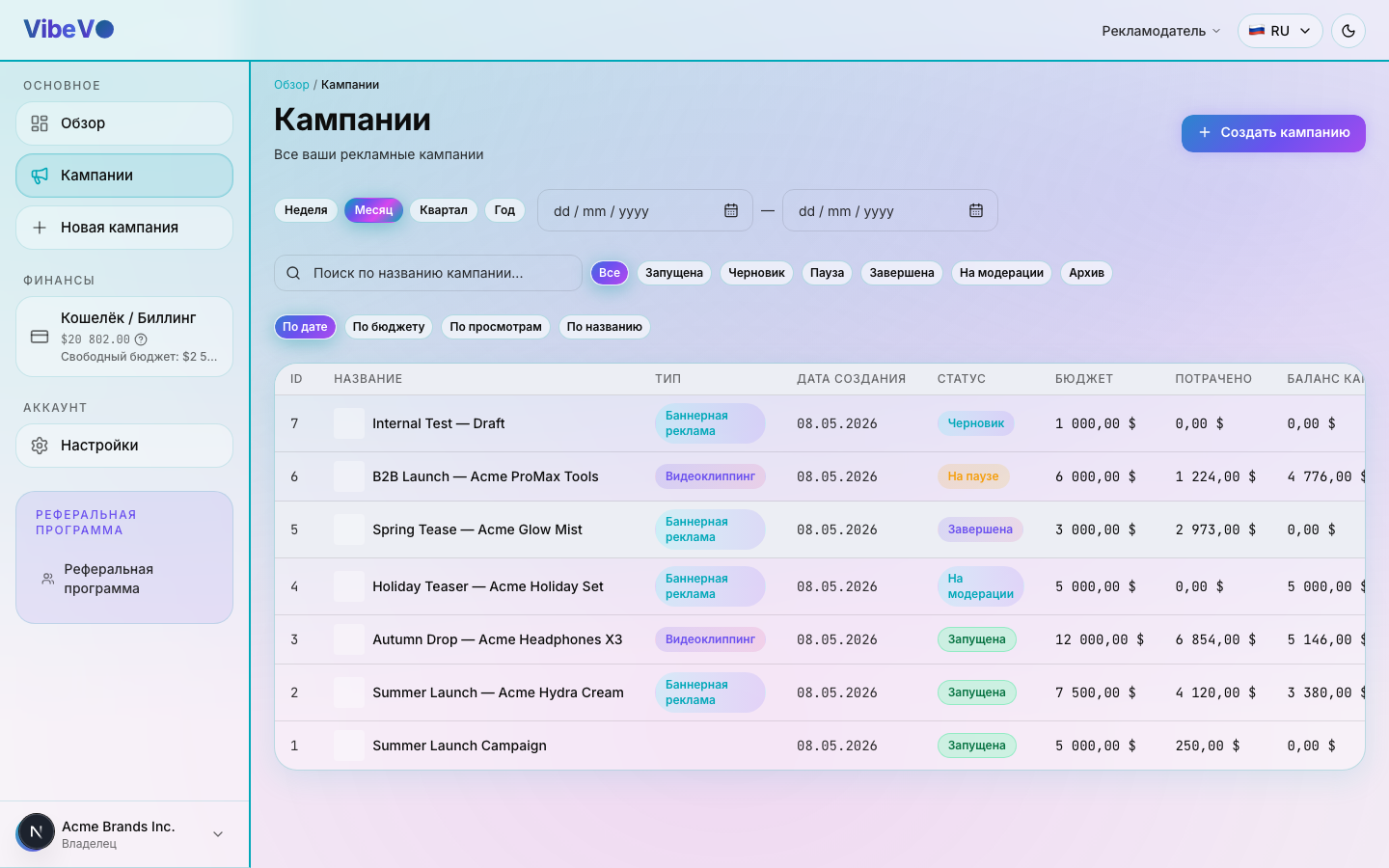
Campaign list
Each campaign in the list shows the following information:
- Name — the campaign name set at creation
- Type — Sticker ads in viral videos, Mass posting with your content, Long-form video clipping and scaled distribution, Mass advertising in Stories, or Brief-based AI content
- Status — current campaign status
- Budget — total budget and remaining amount
- Views — number of views accumulated
- CPM — rate per 1,000 views
- Created — when the campaign was created
Campaign statuses
| Status | Description |
|---|---|
| Draft | Campaign created but not yet submitted for moderation |
| Under review | Campaign submitted and awaiting moderator review |
| Info requested | Moderator requested additional information — make changes and resubmit |
| Active | Campaign approved and available to creators |
| Paused | Campaign temporarily stopped by the system or platform team |
| Rejected | Campaign failed moderation — corrections required |
| Completed | Budget exhausted or campaign permanently stopped |
Filters and search
Use the filter panel above the list to find campaigns quickly:
- By status — select one or more statuses
- By type — Sticker ads in viral videos, Mass posting with your content, Long-form video clipping and scaled distribution, Mass advertising in Stories, Brief-based AI content
- By date — filter by creation period
- Text search — search by campaign name
Resuming a paused campaign
Advertisers cannot manually pause a running campaign. If the system or staff paused it, check the reason. When “Resume” or “Start” is available and launch conditions are met, it can return to running.
Creator applications
The Creator applications panel appears for campaigns with preapproval. One creator can submit several social accounts, so creator and account counts differ. Platform staff enable preapproval.
With decision permissions, review the selected accounts: approve all or keep only selected accounts and confirm. Deselected accounts are rejected; you can reject an entire application with a reason. Rejected applications can be reconsidered. Read-only access does not allow decisions.
Follow the statuses and response deadline shown in the interface: missing the deadline may trigger automatic approval. Account approval permits participation; each submitted post still has its own review. Contact platform staff about revoking an existing approval.
Closure and unused funds
“Close campaign” is irreversible. Read the consequences for the current campaign state before confirming. Closure is different from a pause: platform staff can pause a campaign manually, and resuming is possible only where that action is available.
A draft is not delivering yet, so it does not need the same submission period as a running campaign. A completed campaign can also proceed to final closure without that period. For a campaign with active creators, closure may include accepting work already in progress, review and final settlement.
Read the submission and final closure deadlines in the campaign card. Clicking the button does not mean an immediate refund: unused funds return to free balance after final closure. This is an internal refund, not a withdrawal to an external wallet.
Starting a campaign from a copy
Copying helps you use an existing campaign as the basis for the next one. Clicking “Copy” opens a new campaign for editing in draft status. The original campaign remains separate.
The draft receives the main conditions, including the budget and rates, text, materials and targeting. This does not transfer the remaining funds or continue the previous report: the new campaign’s posts and statistics will appear as it runs in its own right.
Before submitting, check:
- The name, whether the brief is up to date, and the requirements for posts.
- Links, the cover image and working materials.
- The budget, rates, format and geography.
- Dates, access to the campaign and any special settings shown on screen.
Do not assume the copy transfers every special restriction from the original campaign exactly: some settings, including slots, are not copied by this action. For internal settings unavailable to your role, contact the responsible staff member.
Save or submit the new draft using the usual launch process. Clicking “Copy” alone does not launch the campaign or make it available to creators.
Was this article helpful?
Updated: September 23, 2026