Campaign catalog
The campaign catalog shows all available ad campaigns you can participate in. Use filters to find the right offers.
Public offers are available in the catalog immediately after launch at every level. From level 7, new-offer notifications are sent without the additional three-hour delay; below level 7, sending starts three hours later. Notification subscription settings and delivery conditions still apply.
Closed campaigns become accessible from level 10. Existing invitation lists and blacklists still apply: your level alone does not override a campaign’s restrictions. Closed campaign launches are not broadcast.
Before choosing a campaign, compare the work, source materials, and submission process in Campaign types: a creator guide.
Full offers are hidden from the general list; refresh it after a place becomes available. You can still open and submit to offers you have taken through “My in-work”. Participation rules: Offer slots and taking offers.
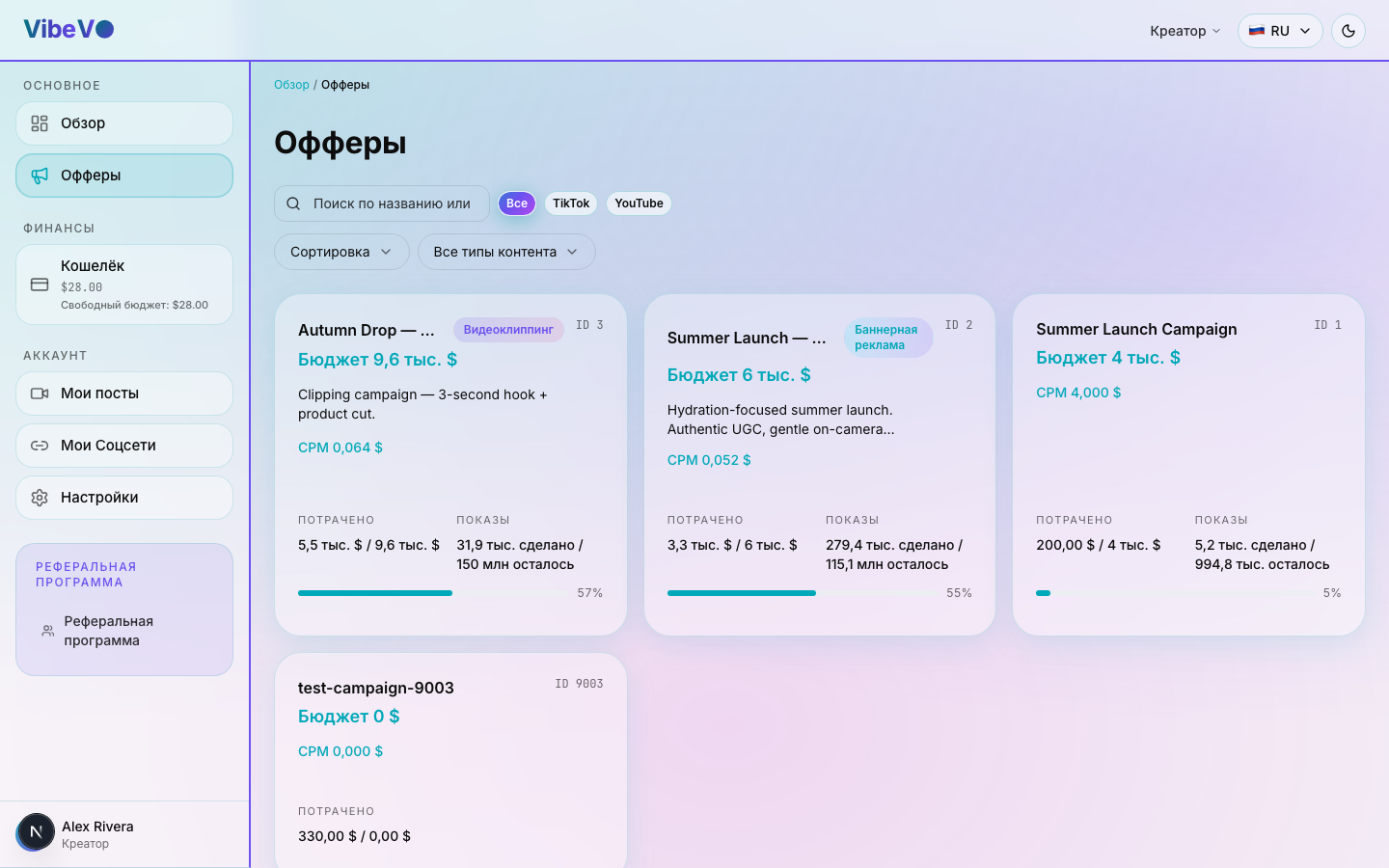
Campaign card
Each campaign in the catalog is shown as a card with the following information:
- Name — the campaign name from the advertiser
- Type — for example, clipping, mass posting, banner ads, UGC, and Stories
- Description — what to advertise and what the requirements are
- CPM — rate per 1,000 views (your earnings)
- Platforms — YouTube, TikTok, Instagram, VK Video (or all)
- Requirements — minimum followers, content categories
- Remaining budget — indicator of available funds in the campaign
Filters
The filter panel lets you narrow down results:
- By platform — YouTube, TikTok, Instagram, VK Video
- By campaign type — for example, clipping, mass posting, banner ads, UGC, and Stories
- By CPM — minimum rate
- By category — gaming, beauty, tech, lifestyle, and more
- Text search — search by name or description
How to participate
Choose a campaign
Browse the catalog and pick a campaign that fits your content and audience. Pay attention to the requirements and CPM rate.
Open the offer
Open the campaign card to read the detailed requirements and instructions from the advertiser.
Read the requirements
Carefully read the description: which key points to cover, what integration format to use, any restrictions. Make sure your content is a good fit.
Take the offer and confirm the terms
Click "Take it on". When the slot system is enabled, check the first-video deadline, the rules for taking offers without submitting videos, and whether an older offer will be released. Confirm the terms to reserve your place. Read more in Offer slots and taking offers.
Create and publish content
Create a video with the ad integration following the campaign requirements. After publishing, submit the link via the VibeVO interface — the post will go to moderation.
Earn
After approval, eligible views are paid according to the offer terms and within the post’s tracking window. Track metrics on the My Posts page.
- One account can participate in multiple campaigns
- Only one ad integration is allowed per video
CPM and your earnings
CPM is the creator rate per 1,000 credited views. The offer shows it after the platform commission. The rate per million is the same figure multiplied by 1,000: for example, 0.50 USD per 1,000 means 500 USD per million. This is a conversion example, not an earnings promise.
The final amount depends on payable views, the counting window, minimum and maximum payouts, the social account limit, and the remaining budget. Separate bonuses apply only when their conditions are met; do not automatically add them to the displayed base rate.
If the offer uses threshold rewards, follow its table of thresholds and payouts. CPM does not apply to that payment model.
Audience geography
Check the offer for its CPM pricing region and required audience share. The share is the percentage of the account audience in the target region according to verified account statistics, not the country where you published the video. A share below the requirement is flagged to the moderator; missing statistics do not count as meeting it.
An offer with an active Russia region check and Russian in its language targeting may display a VPN adjustment: the Netherlands, Poland, the United States, France, Germany, Lithuania, and Latvia are added to the Russian share. The sum is compared with the current offer threshold. Your interface language does not activate this rule; it does not apply to every Russian-language offer, other regions, or threshold-based payment. The original country statistics remain unchanged.
Budget limit per social account
When a CPM offer has a social account limit, all posts from that account share its allowed portion of the campaign budget. The cap counts the full amount charged to the advertiser before the commission is split out, not creator earnings after commission. For example, with a total account cap of 100 USD, budget spending of 60 and 40 USD on two posts together uses up the cap. It is not 100 USD of budget for each post.
Once the cap is reached, new views from that account are not paid for now. Check its progress and current terms: the available amount may change with the budget or settings. The per-post cap applies separately. A slot is creator participation and does not reserve money.
Was this article helpful?
Updated: October 9, 2026