My posts
The My Posts page shows all your publications with ad integrations. Here you can track moderation status, views, and earnings for each video.
Submission depends on the format: videos need a link, while Stories need proof. Follow Campaign types: a creator guide.
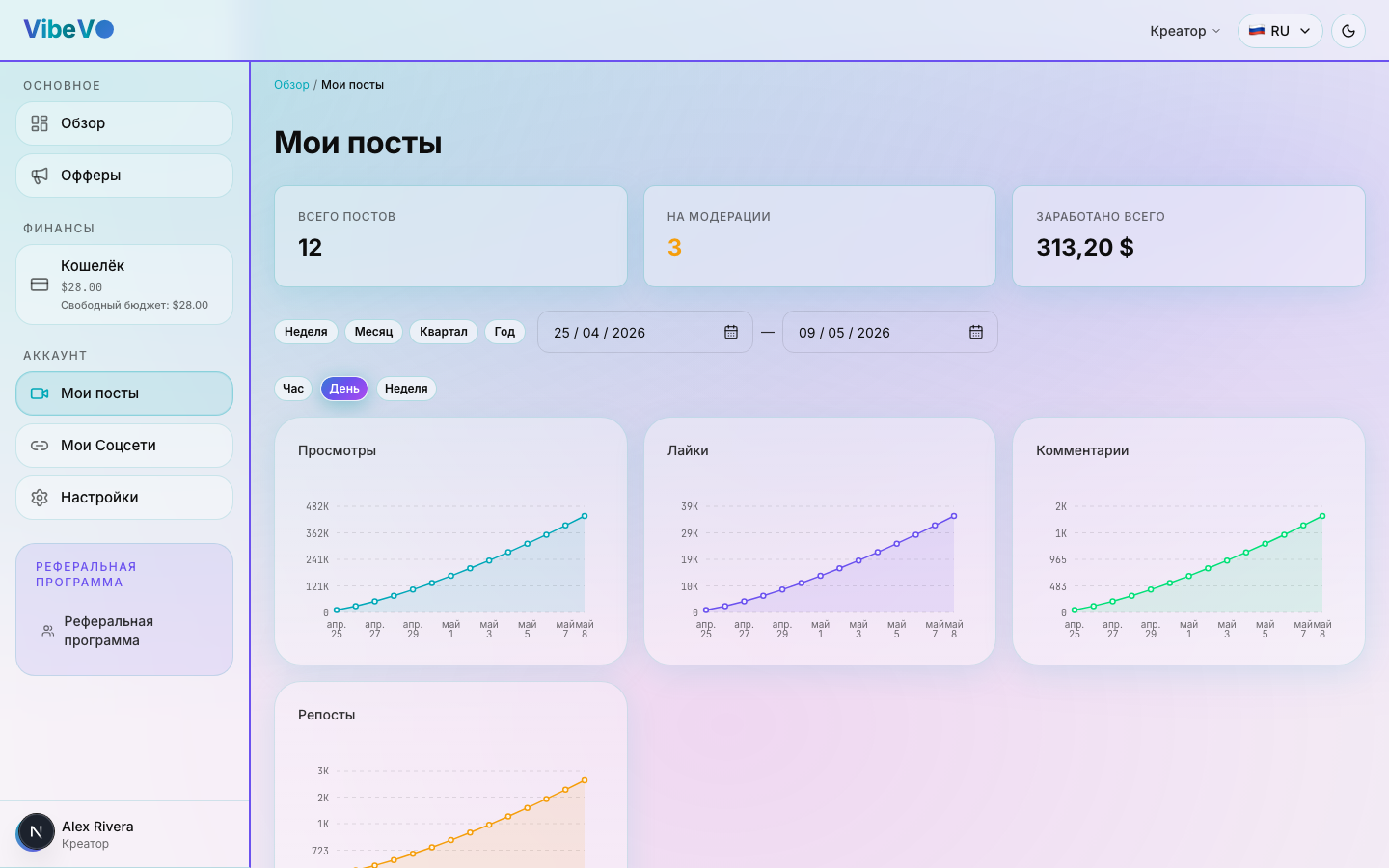
Post information
For each post you can see:
- Video title — the title of your publication
- Platform — YouTube, TikTok, Instagram, or VK Video
- Campaign — the name of the ad campaign
- Moderation status — the current review stage
- Views — latest received data; paid views may differ
- Earnings — amount accrued for this post
- Publication date — when the video was published
Post statuses and next steps
| State | What to do |
|---|---|
| Identifying the account or loading data | Wait for data from the link. If the account cannot be identified, follow the prompt beside the status or contact support. |
| Account verification needed | Open the specified social account and prove ownership. This is a separate step before post moderation. |
| Account statistics needed | Upload the requested statistics using the notice link. If statistics were rejected or the deadline expired, read the reason and available action. |
| Under review / information requested | The post is being checked or is awaiting specified evidence. If statistics are requested, provide the materials listed in the notice. There is no universal guaranteed review time. |
| Accepted | Views and payments follow the offer and post terms. Acceptance does not guarantee a particular payout. |
| Accepted with a payout reduction | Check the displayed reduction percentage and moderation decision; the payout calculation includes that adjustment. |
| Rejected or suspended | Open the decision reason. Corrections and any further submission depend on available actions and the offer terms. |
Views and statistics updates
For videos, VibeVO shows the latest data it received from the social platform. It may lag behind the platform counter; there is no universal guaranteed refresh frequency. Zero immediately after acceptance may mean the first update is still pending.
Total views and paid views are different measures. The counting window, offer rules, review, and budget caps affect payment. For Stories and evidence-based submissions, you enter the claimed views; the moderator sets the confirmed views after reviewing the proof.
Counting window and final earnings
New views are paid within the counting window assigned to that post. Standard mode and streak mode may have different periods: check the dates and terms of the accepted post. A post already accepted keeps its assigned deadline if the setting later changes.
After the window ends, new views do not increase the payout: the post earnings are finalized. Growth in the social platform counter does not extend payment. This window is separate from the deadline for submitting the first video after taking an offer. The offer rules on keeping the publication available still apply.
Minimum payout per post
While a post earns less than the offer minimum payout, its amount accumulates separately from the available balance. If it does not reach the threshold before its counting window closes, that accumulated amount is not paid. Check the threshold and deadline in the post details.
This is different from the minimum wallet withdrawal, which applies to a request for funds already available. Several posts below their payout thresholds do not become available funds merely because their combined amount exceeds the withdrawal minimum.
Maximum payout and other caps
The maximum payout is the upper limit for one post. Once it is reached, additional views do not increase that post payout. A shared social account cap and the remaining campaign budget may apply separately.
For example, with a 50 USD post maximum and only 20 USD left under the social account cap, the post maximum does not guarantee 50 USD. All conditions still apply, including the available budget and counting window.
What to do if a post is rejected
If your post was rejected by a moderator:
- Open the post and read the moderator's comment
- Read the reason and make the corrections allowed by the offer terms.
- Use the action actually available in your interface. If the next step is unclear, contact support with the post link; a resubmit button is not available in every state.
Submitting posts in bulk
In offers with the relevant tabs available, you can submit several posts using a CSV file or a list of links. Use the form for the offer the posts belong to. Stories and carousels have separate forms that require proof: a standard bulk link submission does not replace them.
For CSV, download the template from the form and fill in the post_url column. With the Link list option, enter one full link per line. Before submission, the interface shows valid rows, errors, and any duplicates found. Check the form for the link limit.
Passing the link format check does not mean that a post has been added or approved by moderation. Wait for the results after submitting: some rows may be added successfully while others need corrections. An Already uploaded message means you do not need to submit those links again. Correct and resubmit only the unsuccessful rows. If you downloaded an error report, copy the corrected links into the original template with the post_url column or into the link list: the report file has different columns and is not intended for reimport.
If the form asks you to add or verify an account, complete that action and check the post's status. Bulk submission does not bypass the offer's conditions, account verification, or moderation.
Returning to the list or file does not roll back posts that have already been created and does not guarantee that processing will stop. If an error occurs while waiting, check My Posts and the offer's post list first. If you cannot tell which rows were added, contact support with the offer name and the links in question.
Was this article helpful?
Updated: September 23, 2026