Connect accounts
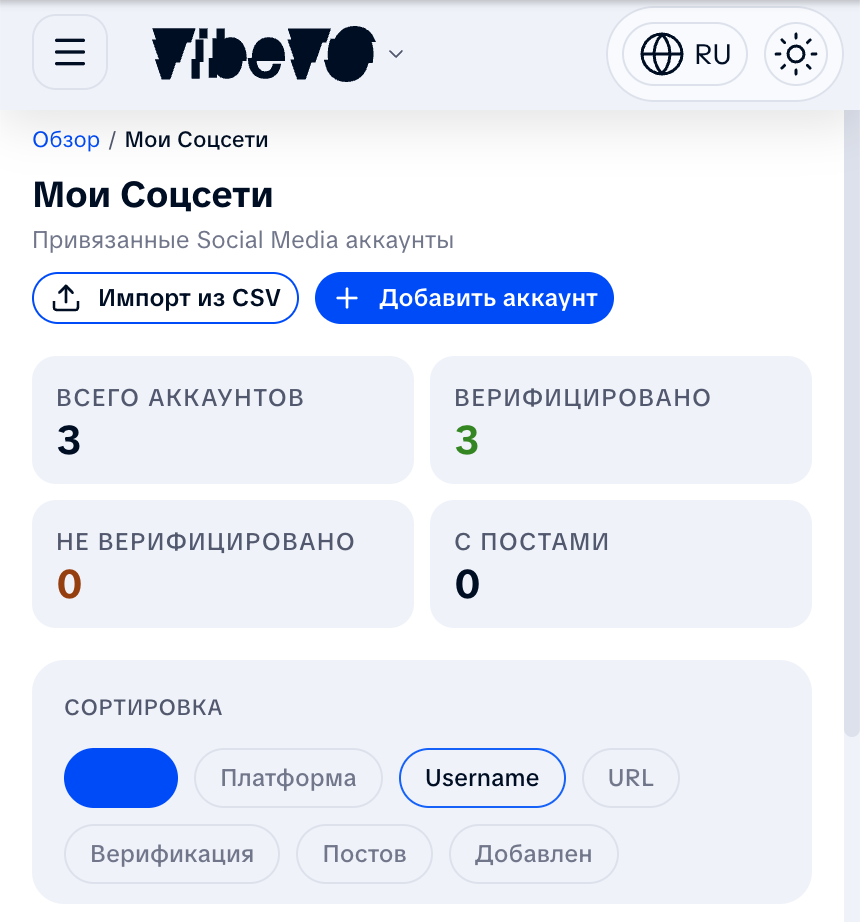
To participate in campaigns, connect at least one social media account. VibeVO supports YouTube, TikTok, Instagram, and VK Video. Your accounts live in the My Socials section of the creator cabinet.
Two ways to prove an account
There are two routes, and they are equivalent: offers, bonuses, and payouts open up the same way. The only difference is how much you do by hand.
| Sign in with the platform | By hand | |
|---|---|---|
| Proof of ownership | You sign in to your social network and the platform confirms the account is yours | A VibeVO code in your profile description |
| Account stats | Come from the platform and refresh themselves. On TikTok that is the follower count only | A screen recording you have to repeat |
| How long it takes | About a minute | 10–15 minutes plus the review of the recording |
| Available today for | YouTube, TikTok | YouTube, TikTok, Instagram, VK Video |
If signing in does not suit you or does not work out, take the manual route — nothing is lost by doing so.
How to prove an account by signing in
Open My Socials
If the account is not in the list yet, click "Add account", pick the platform, and paste the link to your profile or channel.
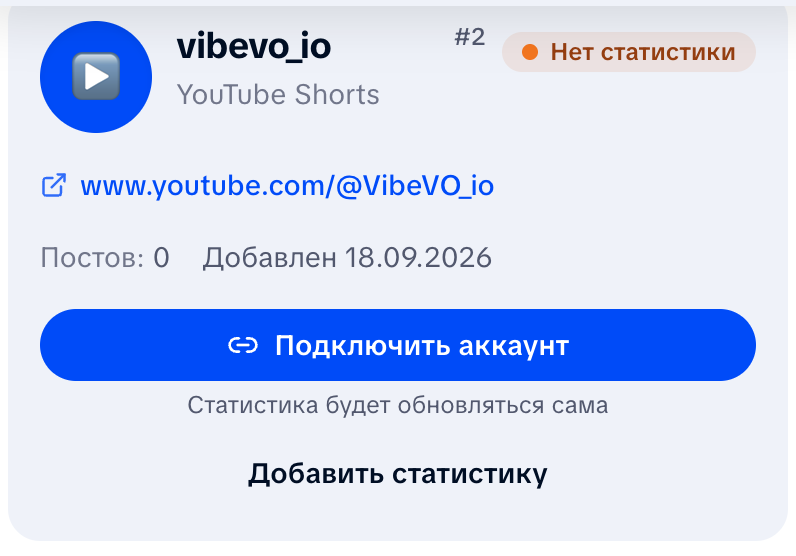
Click "Connect account"
It is the main button on the account card. The line under it says what signing in buys you. On YouTube that is "Verification and stats in one click"; on TikTok it is "Verification in one click" — your followers then update on their own, while audience stats have to be uploaded as a screen recording.
Check what we ask for and click "Continue"
VibeVO shows exactly which data it requests and states that it cannot change anything in your account.
Sign in on the platform
The platform's own sign-in page opens. Use the account the card belongs to and grant access. Tick every permission you are asked for — if you leave one out, the connection will not complete.
Come back to VibeVO
The card now shows a green "YouTube connected" marker and the date of the last refresh. From here the stats update on their own. On TikTok only part of them does: the follower count.
Read access only: the account name, the follower count, and aggregated audience stats. VibeVO cannot post videos, send messages, or change anything in your account. You can revoke access at any time — see "How to disconnect" below.
If you close the platform's window or click "Cancel", nothing happens — the account stays exactly as it was.
If the platform did not share audience data
Sometimes the platform confirms ownership but does not share audience geography and demographics — typically for smaller accounts, or when there were few views over the last 28 days. The card then shows an "Account ownership confirmed" marker and a short explanation.
That does not hold anything back:
- the account is proven — offers and payouts are open;
- the follower count keeps updating automatically;
- videos go to moderation as usual.
If you want advertisers to see your audience — gender, age, and geography — click "Add stats" on the same card and upload a screen recording. Stats you upload become the main ones, and the automatic refresh will not overwrite them.
Platform requirements
- YouTube. Sign in with the Google account the channel belongs to. YouTube only shares audience geography and demographics when the channel had enough views over the last 28 days. If there is not enough data, the follower count still updates and you can add the audience with a screen recording.
- Instagram. Signing in with Instagram is not available yet — we are waiting for the platform to confirm it. Prove Instagram accounts by hand: a code in the profile description and a screen recording. Once signing in opens up it will only work for a professional account — Business or Creator; switching is free and takes a minute in the Instagram settings. Instagram shares audience data at roughly 100 followers.
- TikTok. Sign in with the TikTok account you want to prove. Ownership is confirmed right away and the follower count updates by itself. TikTok does not share audience geography and demographics through its API, and they will not appear on their own: audience stats have to be uploaded as a screen recording. None of that stops you from getting started.
- VK Video. Manual proof only: a code in the community or channel description.
Proving an account by hand
This route works for every platform. Below is what to paste and where, platform by platform.
YouTube
Click "Add account" → YouTube
On the Accounts page, click the add button and select YouTube.
Enter your channel link
Paste the link to your YouTube channel in the format youtube.com/@username or youtube.com/channel/ID.
Confirm ownership
Add the provided code to your channel description or publish a video with the code. The code can be removed after confirmation.
Wait for verification
After saving the code, run the check from the account card or wait for the background checks. The code is time-limited, so start a new verification if it expires.
TikTok
Click "Add account" → TikTok
Select TikTok from the platform list.
Enter your profile link
Paste the link in the format tiktok.com/@username.
Confirm ownership
Add the provided code to your TikTok profile bio.
Click "Add account" → Instagram
Select Instagram from the platform list.
Enter your username
Enter your Instagram username without the @ symbol.
Confirm ownership
Add the verification code to your Instagram profile bio.
VK Video
Click "Add account" → VK Video
Select VK Video from the platform list.
Enter your channel link or community ID
Paste a link in the format https://vk.com/video/@your_handle or https://vk.com/video/club123456. A short handle is also accepted.
Confirm ownership
Add the verification code to your community or channel description. Once saved, VibeVO will automatically verify the code via the VK API.
Stats video upload with a challenge code
If you can't place the code in the description, open the Stats section of your account and click "Start session" — the system issues a challenge code and a 10-minute timer to record and upload the video.
- Show the code within the first 30 seconds of a screen recording from your social media app
- Capture the stats for the last 28 days — views, followers, geo, and demographics (where available)
- Upload the video in MP4 or MOV format, up to 200 MB, up to 3 minutes. You can drag-and-drop the file into the upload area or pick it via the button
After upload, AI extracts the metrics automatically. If AI can't recognize the data, the session goes to manual moderator review, usually within 24 hours.
- Active (REQUESTED) — session started, awaiting upload
- Uploaded (UPLOADED) — video received, AI is analyzing
- Pending review (REVIEW_NEEDED) — AI couldn't handle it, waiting for a moderator
- Verified (VERIFIED) — stats applied to your account
- Rejected (REJECTED) — data wasn't confirmed, you can start a new session
- Expired (EXPIRED) — timer ran out before upload, start a new session
How to disconnect
You can revoke access at any time, either in VibeVO or on the platform itself. The proof of ownership, the account, and your posts all stay where they are.
- In VibeVO. Open the account card, click "⋯", and choose "Disconnect access". Only the stats stop refreshing.
- YouTube is the exception. YouTube's rules require us to delete the statistics we received from YouTube when you disconnect. After that you will need a screen recording to submit videos.
- Google and YouTube. On the Google Account permissions page.
- Instagram. Settings → "Your apps and media" → "Apps and websites" → the "Active" tab → "Remove" next to VibeVO (Instagram's own instructions).
- TikTok. Profile → Menu → "Settings and privacy" → "Security & permissions" → "Apps and services permissions" → VibeVO → "Remove access" (TikTok's own instructions).
What happens to the data afterwards is covered in section 13 of the Privacy Policy.
- The account must be public (not private)
- Follower thresholds depend on the campaign and platform settings
- One social media account can only be connected to one VibeVO profile
- Without confirmed ownership, campaign participation and withdrawals are unavailable — see Platform rules
- Besides proof of ownership, an account needs stats: signing in brings them automatically, the manual route needs a screen recording — otherwise videos will not go to moderation. Step by step: Verification and stats
Account statuses
| Status | Description |
|---|---|
| Pending verification | Account submitted for review |
| Verified | Account approved, you can participate in campaigns |
| Rejected | Account failed verification — find out why |
Adding accounts in bulk from CSV
In My Socials, you can add several accounts using one CSV file. First, download the template from the import window: it contains the required account_url header. Enter the full link to one account on each row, not a link to an individual post. File size and the number of rows are limited; the current limits are shown in the form.
- Fill in the template and upload it in the import window.
- Review the list before submitting. Fix any invalid addresses and duplicates flagged by the check.
- Submit the ready rows and wait for the result.
- Compare the number of added accounts with the number of rows containing errors. If needed, download the error report, correct the problem addresses, and copy only those addresses into a new file based on the original template with the
account_urlcolumn. The error report itself has different columns and cannot be used for reimport. - Open the cards of the added accounts and complete the required verification and statistics steps.
Importing does not verify account ownership or replace the audience check. If some rows fail, successfully created accounts remain in your cabinet. Returning to the file or closing the window does not guarantee that processing already submitted will be cancelled. If the result has not appeared yet, refresh the account list first instead of resubmitting everything without checking.
Was this article helpful?
Updated: September 23, 2026